
News flash – Zoom is now limiting free meetings to just 40 minutes, including one-on-one classes. Of course, you can simply upgrade to a paid plan to remove this restriction, but before you splash the cash let’s check out these FREE Zoom alternatives for online teaching – each with longer time limits than Zoom (or no limit at all), to prevent disruption to your classes.
VooV – best Zoom copycat
VooV (also known as Tencent Meeting) is essentially a Chinese copy of Zoom and has very similar core features.
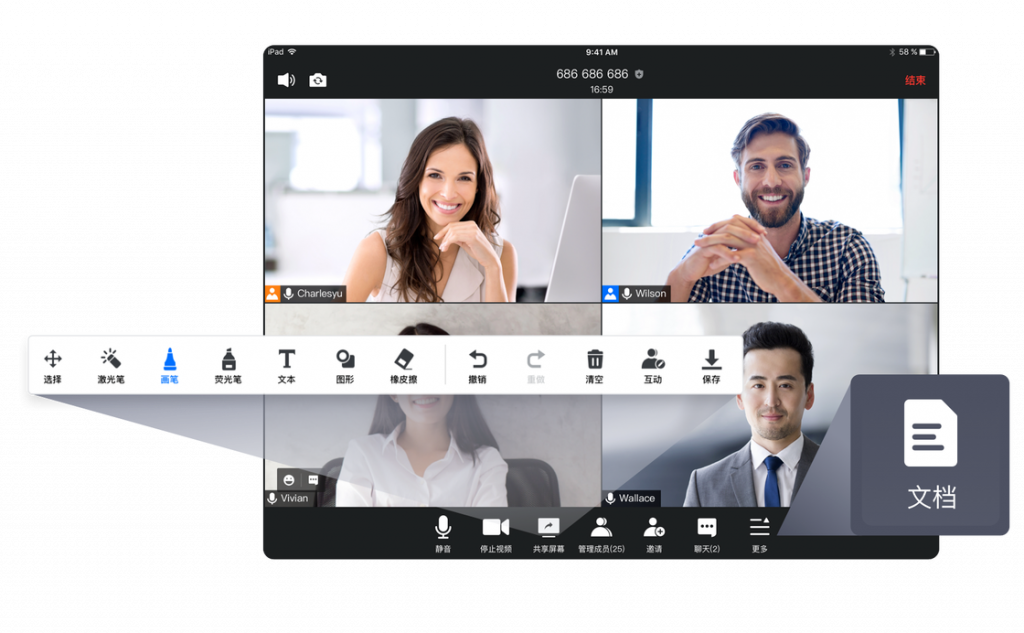
✅ 60 minute meetings for up to 30 students
✅ Screensharing and annotations
✅ Simple virtual whiteboard system
✅ In-class chat/ messaging system
✅ Record classes locally
✅ WeChat mini-app for Chinese students
✅ Easy option if you’re familiar with Zoom
❌ No breakout rooms
❌ No mouse control or co-browser for direct interactivity
❌ No out-of-class messaging
VooV is a particularly good option if you are teaching Chinese students, as it is well-known and supported in China. It has a very similar professional vibe to Zoom, so particularly suits older children or teen / adult learners.
CoRoom – best for small groups
A less well known option, but a solid free Zoom alternative! CoRoom has many of the core features online ESL teachers need, even in the free plan.
✅ No time limit for one-on-one or groups
✅ Screensharing with annotation
✅ Good virtual whiteboard, including document uploads
✅ Collaborative document editor for e.g. essay writing
✅ Host from computer, phone or within the browser
✅ Record to your computer
❌ Maximum of four participants in the free plan
❌ No breakout rooms
❌ No out-of-class messaging
❌ No mouse control or co-browser for direct interactivity
Although CoRoom is relatively basic compared to the other options on this list, it could be a great choice for you if you teach small group classes and want a system which looks more formal.
DingTalk – best for file editing/ whiteboard lessons
DingTalk is an excellent business messaging and collaboration app – however, they also have an online classroom system, which was used by many schools during the coronavirus pandemic.
It is best considered a lightweight version of ClassIn rather than Zoom, but with no time limits!
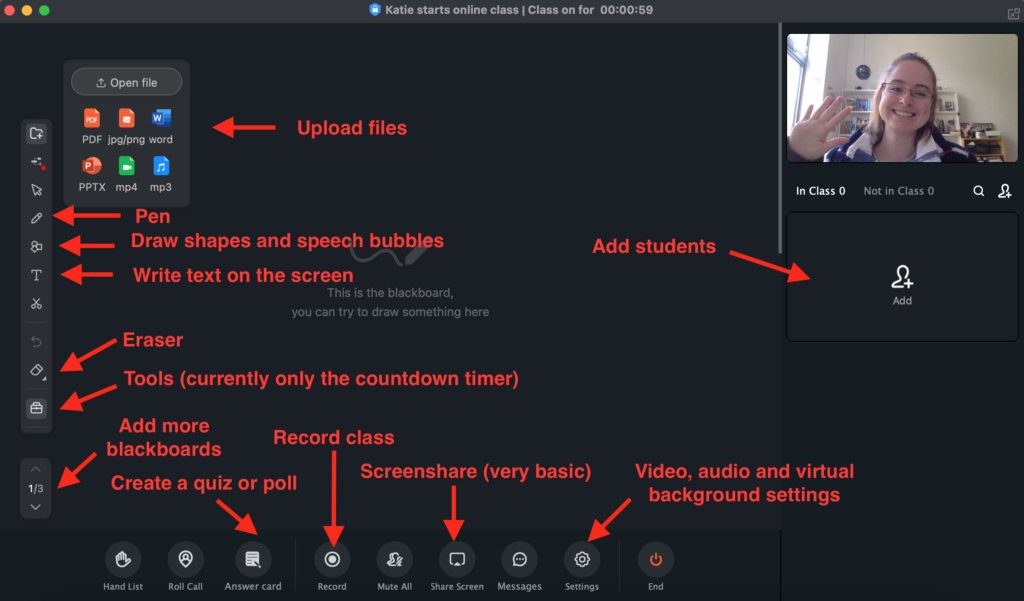
✅ Advanced online whiteboard system
✅ Upload files (worksheets, slides, etc) directly to the whiteboard
✅ Simple games: polls and timer
✅ Record classes locally
✅ Excellent out-of-class tools, particularly file sharing and collaboration (great for homework or collaborative projects)
❌ NEW 40 minute meeting limit
❌ Screensharing is more basic, with no annotation tools
❌ No breakout rooms
❌ No mouse control or co-browser for direct interactivity
Although the online classroom system in DingTalk is relatively basic, the out-of-class tools really help it stand out compared to other free zoom alternatives for online teachers. You can message your students, schedule classes, and share documents for them to edit in the cloud. It is a little formal/ business-like, but would be a great option if you are teaching teens or adults and want to take advantage of the ability to collaborate on files.
Google Meet – best basic option
Google Meet is a great option if you are already in the Google ecosystem and want something simple, or as a back-up option alongside other tools.
✅ 24 hour time limit for one-on-one classes.
✅ Up to 60 minutes for group classes
✅ Screensharing
✅ Integrates with Google docs for collaborative editing
✅ Host from computer, phone or within the browser
✅ Fun video filters, emoji reactions, and other tools
❌ No whiteboard
❌ No recording
❌ Paid plan required for annotations on screenshare
❌ No breakout rooms in the free plan
❌ No mouse control or co-browser for direct interactivity
Google Meet is a bit more basic in terms of teaching tools, but a solid option if you want something simple that integrates well with other Google apps (e.g. calendar for scheduling, Google docs for collaborative writing assignments, etc). However, the lack of a whiteboard is a deal-breaker for many online teachers.
So which is the best free Zoom alternative?
If you want something that is essentially a Zoom copy, then check out VooV, whereas if you teach conversation-focused classes then Google Meet could be a good lightweight option. For more whiteboard-focused teaching approaches (particularly if you’d like to upload files to collaborate on), check out CoRoom or DingTalk.
Ultimately though, it’s also important to remember that as an independent online teacher you are also your own business – and sometimes it’s worth investing in the tools that make your business stronger.
So there we go – a selection of awesome free Zoom alternatives! Which is your favourite, or do you have any other recommendations? Feel free to share in the comments ❤️
Thanks for this informative post! I’ve been looking for Zoom alternatives that don’t have time restrictions, and your list is super helpful. I can’t wait to try out these options for my online meetings!
Thanks for your comment – I’m glad to hear you found this post helpful! 🙂
Dear VooV Meeting users,
Thanks for your continuing support. Since being launched, VooV Meeting has been committed to providing an efficient and stable online meeting experience.The VooV Meeting Pro plan will be launched starting from July 31, 2024, and the Free plan will be adjusted.
answerThe Pro plan supports meetings with a maximum of 100 participants and maximum duration of 24 hours. In addition, the Pro plan provides more value-added features, such as larger cloud recording space and more number of participants who can enable video simultaneously. This plan can meet requirements in business, education, training, and other scenarios. You can subscribe to the VooV Meeting Pro monthly or annual plan.
answerThe Free plan supports meetings with a maximum of 100 participants. The maximum duration is 60 minutes for a meeting with 3 to 100 participants and 24 hours for a meeting with 2 participants.
*The maximum number of participants in a meeting and the meeting duration are determined by the VooV Meeting version used by the meeting initiator. Users do not need to pay for fees for attending meetings of the Pro or Free plan.
The following table describes the differences between the Free and Pro plans.
Pro Plan
Free Plan
Price
Monthly: USD 14.99
Annual: USD 149.00
Free
Maximum Number of Participants (Including the Host) in a Meeting
100 participants
100 participants
Maximum Meeting Duration
24 hours
Meetings with 2 participants:
24 hours
Meetings with 3 to 100 participants:
60 minutes
Number of Co-Hosts
2 co-hosts
0
Number of Participants Who Enable Video Simultaneously
Maximum 60 participants
Maximum 30 participants
Cloud Recording Space
10GB
1GB
You can continue to use the Free plan or subscribe to the Pro monthly or annual plan based on your requirements. VooV Meeting strives to optimize its product features to offer a better online meeting experience.
Thanks again for your support for VooV Meeting. If you have any questions, contact VooV Meeting’s customer service personnel who will serve you sincerely.
FAQs
1. Will the duration and number of participants of a meeting I book after July 31, 2024 be adjusted?
Starting from July 31, 2024, the maximum meeting duration and the number of participants of the Free plan will be gradually adjusted in phases. Meetings held before the adjustment are not affected. If you have booked a recurring meeting, plan it in advance. For meetings held after the latest Free plan is released:
answerFree plan: The meeting duration is capped at 24 hours for a meeting with 2 participants and capped at 60 minutes for a meeting with 3 to 100 participants.
answerPro plan: You can subscribe to the Pro plan. In the Pro plan, a meeting contains up to 100 participants, the meeting duration is capped at 24 hours, and more value-added features are available.
2. Will the maximum duration of a meeting initiated by a user of the Pro plan be affected if I use VooV Meeting of the Free plan to attend the meeting?
No. The maximum meeting duration is determined by the VooV Meeting version of the meeting initiator. Users do not need to pay for fees for attending meetings of the Pro or Free plan.
answerIf the meeting initiator uses the VooV Meeting Pro plan, the maximum meeting duration is 24 hours.
answerIf the meeting initiator uses the VooV Meeting Free plan, the meeting duration is capped at 24 hours for a meeting with 2 participants and capped at 60 minutes for a meeting with 3 to 100 participants.
3.What can I do if I want to initiate a meeting with more than 100 participants?
answerAfter the adjustment, a meeting can contain up to 100 participants. VooV Meeting is committed to providing more new features. Stay tuned for more details.
Wow, I was skeptical about paying for Zoom, but these alternatives seem like a great solution! I’m definitely going to try Google Meet out. Thanks for sharing!
Awesome, I’m glad this helped! 🙂
Google meet has 1 hour limit for groups
Hi Henry, thanks for the updated info! 🙂
Use Discord. It’s superior.
Thanks for the suggestion! I find Discord is good for building a community, but the video call functionality is too basic for online classes.